
Devices
One library. Every screen.
OVO is an iPhone, iPad and Apple Watch app. Each version is shaped for how you listen on that device, and iCloud keeps your OVO library in sync between them.

iPad
Room to see the whole collection.
A large library needs space. On iPad, sidebar navigation and wide grids let you move between artists, albums and folders without losing your place.
- Sidebar navigation across Library, Albums, Artists, Playlists, Downloaded, Folders and Streams.
- Wide artwork grids that make a big local collection browsable again.
- The same sound controls as iPhone, on a larger surface.
- iCloud sync: keeps your OVO library in sync between your Apple devices.
iPhone
The full player, one-handed.
iPhone is where OVO does everything: importing, browsing, playback, sources and sound, designed to be reachable with a thumb.


Apple Watch
Listening without the phone in your hand.
Apple Watch is not a miniature copy of the app. It does two clearly different jobs, and it is worth knowing which is which.
- Synced local files: play on the Watch itself, which is what you want on a run or a walk.
- Streams and Apple Music: play on the paired iPhone and are controlled from the Watch.
Learn how to play local music on Apple Watch without your iPhone.
On the wrist
Three moments, no phone in hand.
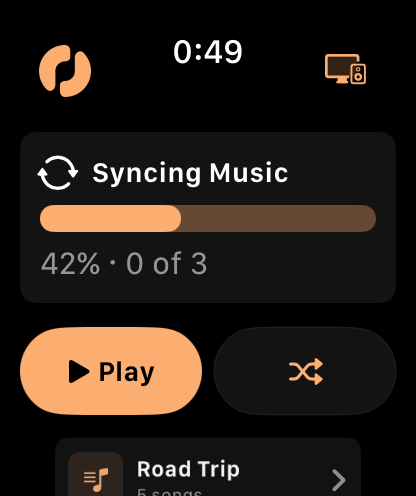
Sync first
Music is copied to the Watch before a run, with clear progress while it transfers.
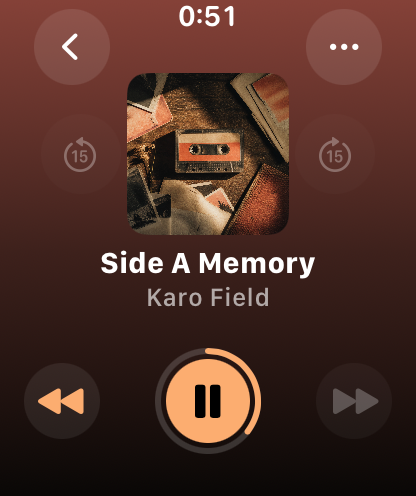
Play it locally
Once synced, an album plays from the Watch itself — no phone, no connection.
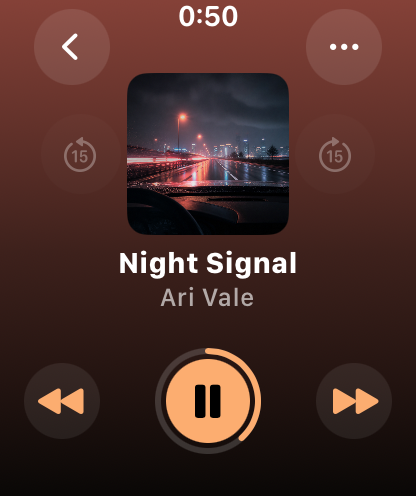
Full controls
Now Playing is a real screen with artwork and transport, not a shrunken remote.


Get OVO on the App Store
OVO is an iPhone-first music player that also runs on iPad and Apple Watch. Download it, point it at the music you already own, and start listening.